Connect Claude Code to Builder Studio
Add the MCP server with one command, sign in through your browser, and ask Claude Code to work on your canvases.

Add the server
With Claude Code installed, run this command in a macOS, Linux or WSL terminal.
claude mcp add-json --scope user builderstudio '{"type":"http","url":"https://builder.studio/api/mcp","headers":{"Mcp-Readback":"text"},"oauth":{"scopes":"canvases:read canvases:write assets:read assets:write skills:read offline_access"}}'Sign in
Authenticate
In Claude Code, run /mcp, select builderstudio, and authenticate. Start a fresh session after it reports connected.
Approve and check
During sign-in, choose your Builder Studio workspace, review the requested permissions, and approve the connection. Ask your agent to list your canvases to verify it; an empty list is a valid result.
What you approve
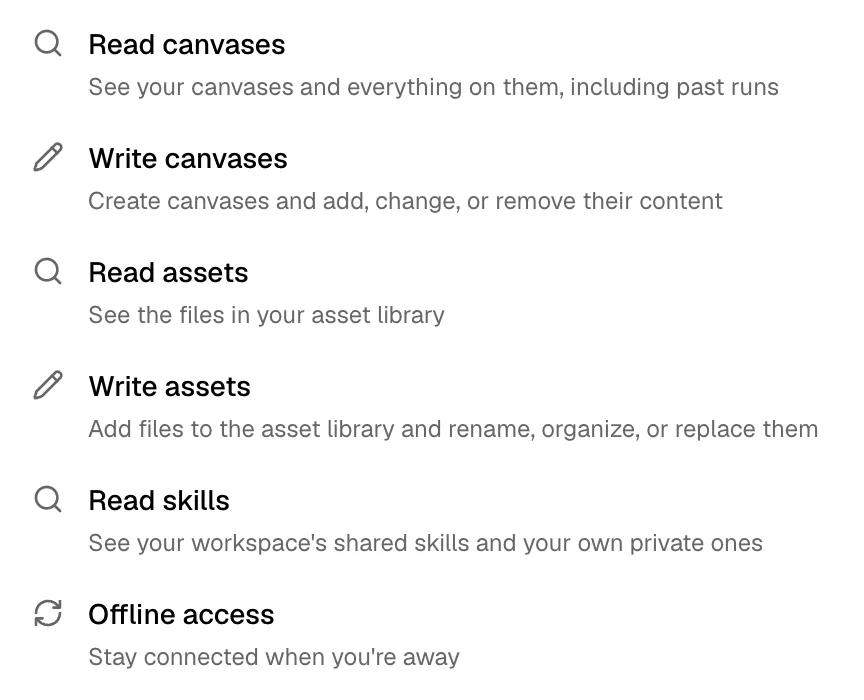
The command asks to read and write your canvases and assets, to read your skills, and for offline access, which keeps the connection while you are away.
What to ask for
The address in the command serves the core tools: write pages onto a canvas as layers, place media, edit, and check the result with a screenshot. For example:
- “Tell me what is on my Launch canvas.”
- “Write a pricing page with three plans onto my Launch canvas.”
- “Place the photo from my assets in the About page’s header.”
- “Take a screenshot of the home page and tighten its spacing.”
- “Read our brand voice skill, then rewrite the hero copy to match it.”
To reach every tool, put https://builder.studio/api/mcp/full in the command instead. It serves every tool your sign-in allows, adding uploads, CMS, GitHub, Google, and design import and export.
Questions
Do I need an API key?
No. Claude Code signs in through your browser. Access keys for other agents and scripts are under API & agents in your workspace settings.
Which workspace does it use?
The one you choose during sign-in.
What if builderstudio is already set up?
Inspect it with claude mcp get builderstudio and update the entry in the scope it reports.